Less busywork.More focus.

SEAMS brings your documents, sales guidance, team tasks, and follow-ups together, so the everyday work takes less of your day.
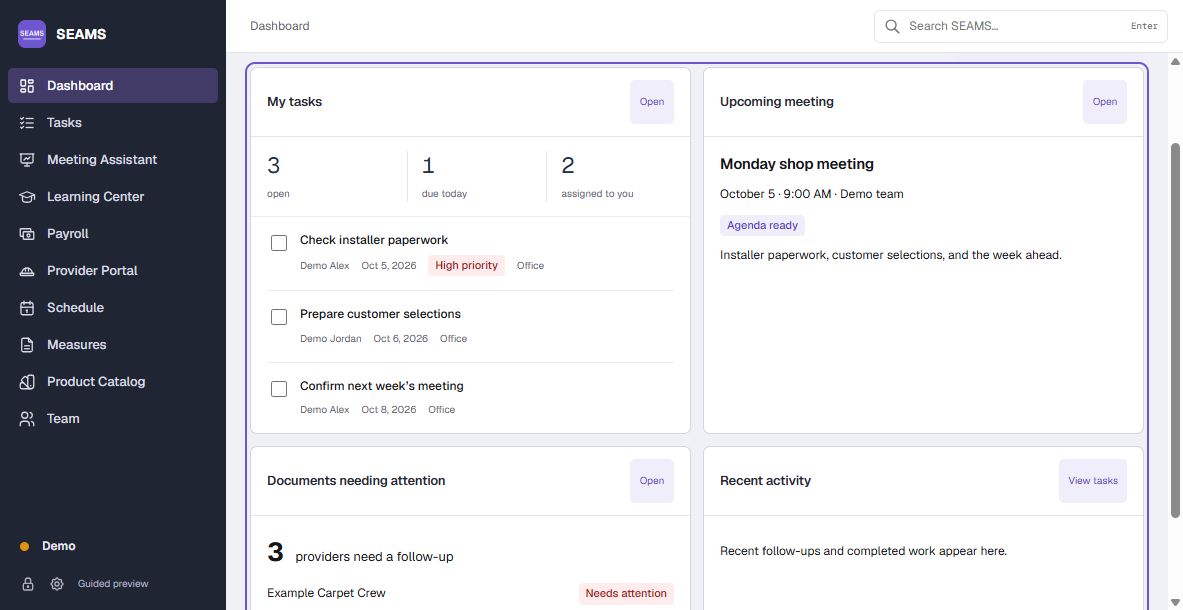
SEAMS dashboardDemo preview
SEAMS demo dashboard showing team tasks, an upcoming meeting, and installer documents needing attention.

Know what to say
to seal the deal.

ProductsServicesCustomer questionsCompany policy
  • Know what you’re offering.Keep product details, service scope, and useful talking points together.
  • Handle the questions that stall a sale.Get practical ways to respond to common objections.
  • Follow your company’s policies.Check sales wording against your company’s approved guidance.
See the handbook with us

Don’t let missing paperwork hold up the job.

Get ahead of the paperwork
Missing expiration datesExpired documentsUnsigned approvals

Before the job starts

Interactive preview
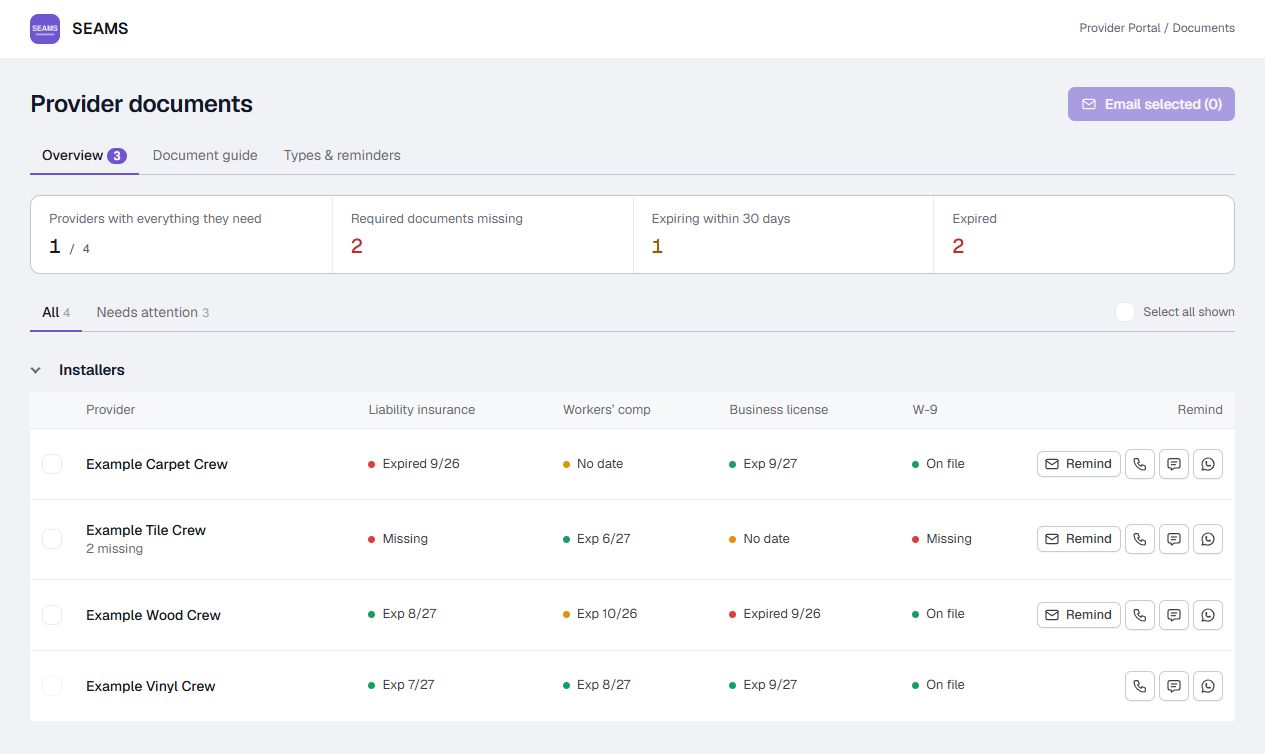
Fictional contractor, crew, and customer paperwork awaiting follow-up. Email and text open message previews. Phone icons show a static integration example.
Contractor, crew or customerRequired paperworkStatusFollow up
Example General ContractorLiability insuranceExpired 9/30/26
Example Service CrewCrew licenseNo expiration date
Example CustomerProduct sign-off & job policiesAwaiting signatures
View the provider documents screenEnlarge the SEAMS documents screen with fictional Example crews, missing dates, and expired documents.

Automate the daily follow-up.

Keep important tasks moving.

Assign work to staff with clear due dates. Automate follow-up tasks and in-app alerts, and prepare email reminders for the people who need them.

  • Tasks for a person or a role
  • Recurring work and overdue tasks

Get the paperwork in before work starts.

Keep general contractor and crew records current. Follow up on customer sign-offs and the policies and procedures your company needs signed before the job begins.

  • Insurance, licenses & renewal reminders
  • Customer approvals & required policy signatures

Email, text & calls.

Use Outlook for reminder emails and Twilio for texts and calls. Open prepared messages in WhatsApp Desktop or Microsoft Phone Link.

  • Outlook
  • Twilio
  • WhatsApp Desktop
  • Microsoft Phone Link

API integrations for
your business.

RFMS

Bring RFMS details into your daily work without retyping customer and job information.

  • Look up customers and job details
  • View order lines, products and quantities
  • Autofill forms and floor plans
  • Compare floor plans with live orders

Available features depend on your RFMS API level: Standard, Plus or Enterprise.

Twilio

Keep provider calls, texts and replies together through your business’s Twilio account.

  • Text paperwork reminders
  • Receive replies inside SEAMS
  • Call providers from SEAMS
  • Use your business’s Twilio number

Connect your Twilio account and business number in SEAMS.

Your choice of AI

Turn meeting notes, sketches and company knowledge into useful drafts your team can review.

  • Draft meeting summaries
  • Identify decisions and follow-up tasks
  • Turn floor-plan sketches into drafts
  • Organize Knowledge Base entries

Choose Claude, Azure OpenAI, an OpenAI-compatible service or local AI.

Interactive demo

Limited demo. Full features aren’t shown.

Dashboard

Dashboard

Heavily simplified demo. The full app has more screens, tools, and options.

Guided preview

Keep the rest of the day moving.

Help customers compare their options.

Bring product photos and options into a customer selection form. Keep selections organized, then collect approval on a sign-off sheet.

  • Browse product photos and key specs
  • Build forms around customer choices
  • Collect customer initials and a signature
  • Save a PDF or email it through Outlook

Make it clear who’s doing what.

Assign work to a person or a whole role, with a due date and priority. Keep track of what’s finished and what still needs attention, without chasing the team for every update.

  • Assign tasks to staff or a team role
  • Set due dates and priorities
  • Repeat routine office tasks
  • Track overdue and completed work

Leave the meeting with a plan.

Be part of the conversation without scrambling to write everything down. Record voices in the room or audio from a video call, then review the transcript and decisions. Turn the next steps into assigned tasks with owners and due dates.

  • Collect ideas and prepare the agenda
  • Record in-person meetings or video-call audio
  • Transcribe on your PC, or import audio, video, and transcripts
  • Draft summaries with a connected AI helper
  • Review and save decisions and summaries
  • Create follow-up tasks with owners and due dates

See where your team needs support.

Planned audit tools will track elapsed time from starting a task or notification follow-up to completing it. Use that history to spot recurring difficulties, build a personal improvement guide, and help managers coach their team.

  • Start times, completion times & elapsed time
  • Follow-up history, delays & progress
  • Personal feedback & practical next steps
  • Manager coaching & training guidance

A demo with our team.
A plan for your business.

Find a time that works.

Open booking calendar in a new tab

Choose by team size.

Prices shown per month. Annual pricing is also listed on each plan.

Shop

$249/month

Or $2,490 per year

Up to 20 users
For a larger team
Ask about Shop

Ask us about the right plan for your business.

How you’ll get SEAMS.

  1. 01Coming soon

    Download & install

    At launch, download SEAMS and follow the setup prompts.

  2. 02At launch

    Set up your business

    Our team will personally help you set up your business, add your team, and connect supported services. The planned 14-day trial starts in the app at launch.

  3. 03At launch

    Choose your plan

    Choose monthly or yearly billing once checkout opens.

  4. 04At launch

    Receive & activate

    Use the license key from your purchase to activate your plan in SEAMS.

Questions about SEAMS

Ask us
Who is SEAMS for?

Retailers, general contractors, and service teams that need tasks, sales guidance, paperwork, and follow-ups in one place. The demo includes flooring and window-treatment examples.

Does SEAMS replace RFMS?

No. SEAMS works alongside RFMS, including its exported payroll reports and supported API connections. SEAMS is not affiliated with RFMS, Inc.

Can SEAMS connect to Twilio or WhatsApp?

Yes. SEAMS is integration capable: Twilio handles texts and calls from the app, while WhatsApp Desktop opens a chat with your message prepared. Microsoft Phone Link and Outlook are also supported. Set up the accounts or desktop apps you want to use in SEAMS settings.

Can SEAMS connect to our catalog or sales system?

RFMS is currently supported. We can assess other catalog, retail, or service-system connections based on their API access and the work involved.

Where is our business’s data stored?

In local folders, or an optional shared OneDrive or SharePoint folder. Your business manages folder access and backups.

Can I use SEAMS without internet?

Your files are local, but license validation and optional online services need an internet connection.

Can I start a 14-day trial today?

Not yet. The planned 14-day trial will be available with the release download.

Where can I read the terms?

The terms and policies will be posted before sales open. They’ll cover cancellation and refunds, privacy, and the app license agreement.
Let’s talk about your business.

Installer payroll report

SEAMS Installer payroll

Demo Flooring Crew

September 21–27, 2026

Fictional jobs and itemized earnings
Job & workEarnings
DEMO-101 · Sample Living RoomLVP installation600 sq ft × $2.00$1,200.00
DEMO-102 · Sample BedroomsCarpet installation90 sq yd × $8.00$720.00
DEMO-103 · Sample EntryTile installation60 sq ft × $6.00$360.00
Gross earnings
$2,280.00
Insurance
−$45.00
Equipment advance
−$75.00
Net pay
$2,160.00

Product screen

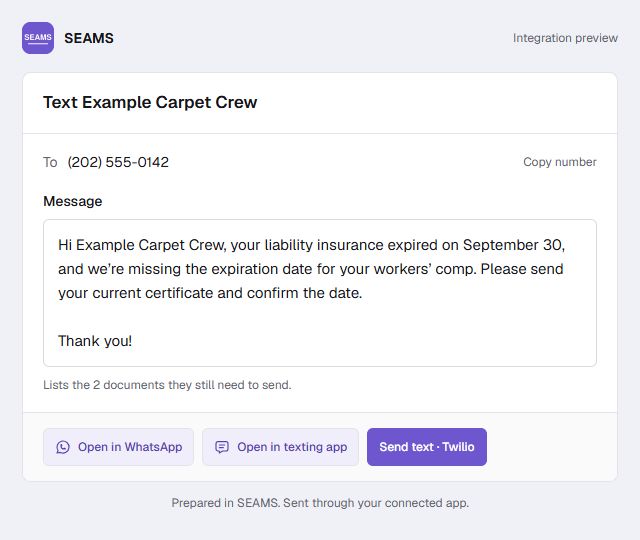
Messages

Text Message · SMS

Reminder preview